Hey everyone,
I’ve just seen @richard.kavanagh s post about ehr-ctrl when I came here to write my own little announcement for the CDR Browser I’ve been building the last few months (with a little help of Claude Code, as experienced people will easily notice when looking at the design  ).
Nice to see the CDR-explorer niche filling out — more options here is a good thing for anyone getting started with openEHR.
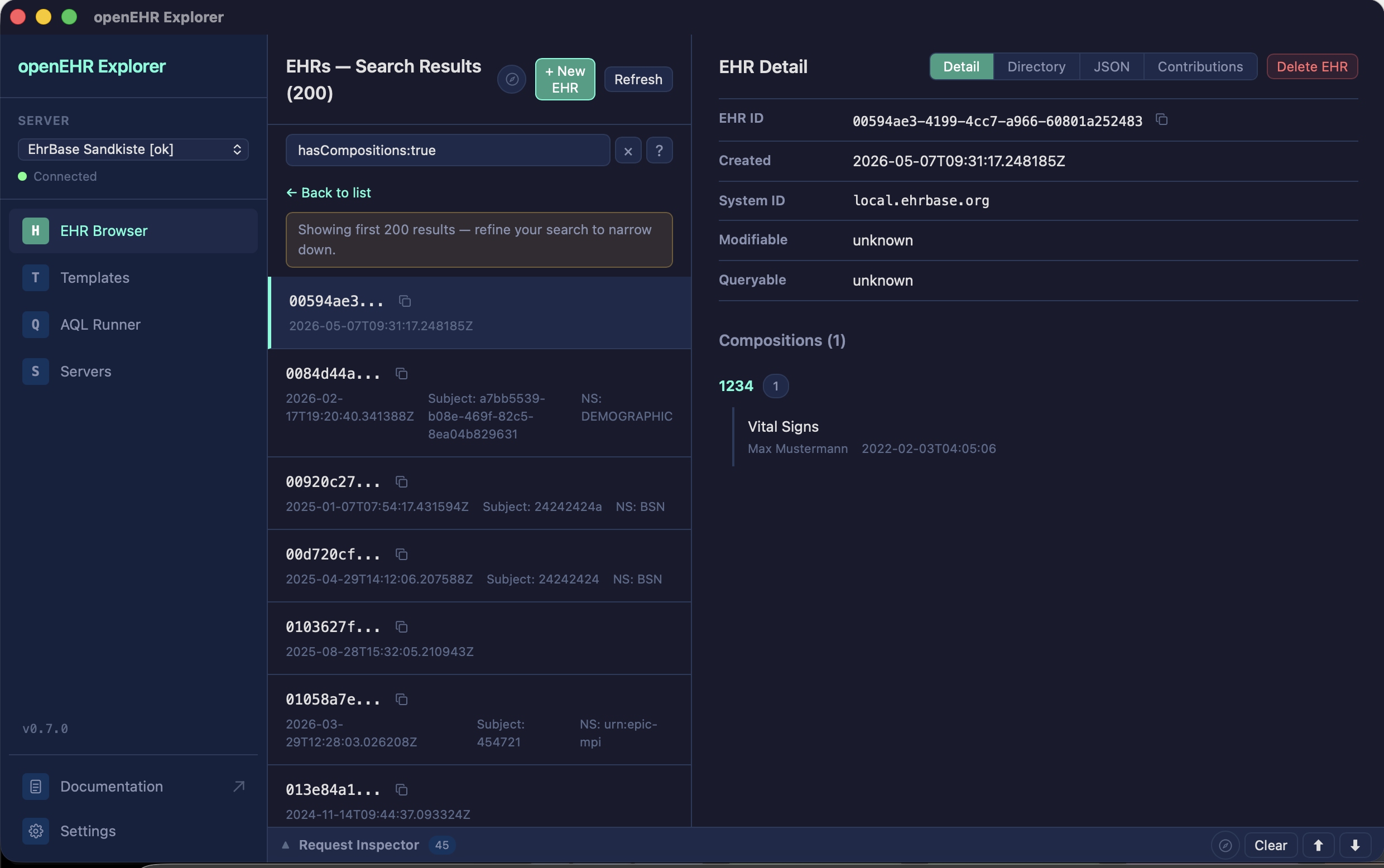
openEHR Explorer is a desktop app for browsing, querying, and inspecting openEHR CDRs (EHRBase, Better Platform) without hand-writing curl commands.
A few things it does:
- Template-aware composition viewer — resolves node IDs to human-readable labels from the loaded Web Template, with a one-click FLAT path panel for SDK work
- EHR browser with server-side AQL filtering, and a request inspector with curl export for debugging
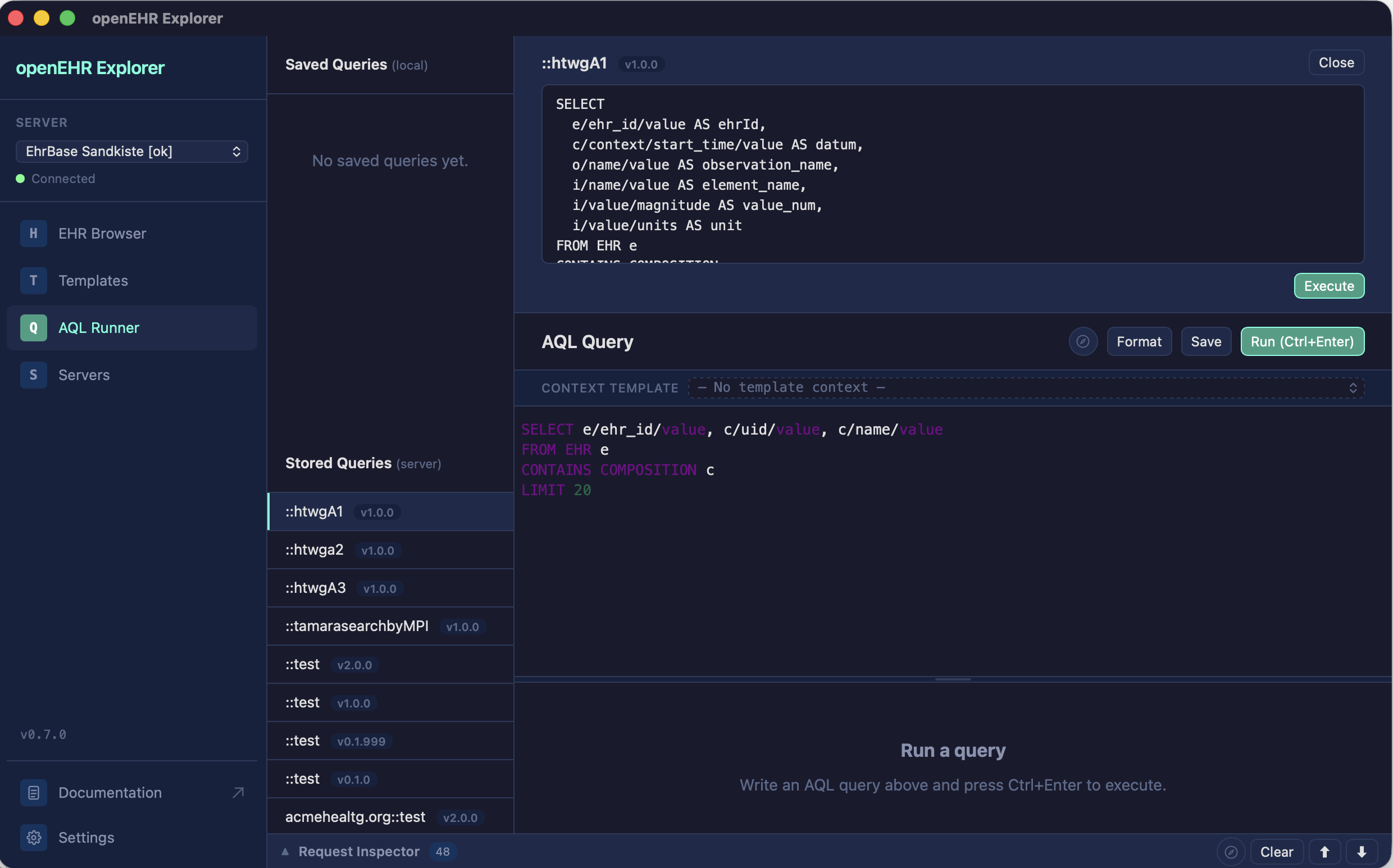
- AQL query runner with autocomplete and CSV export
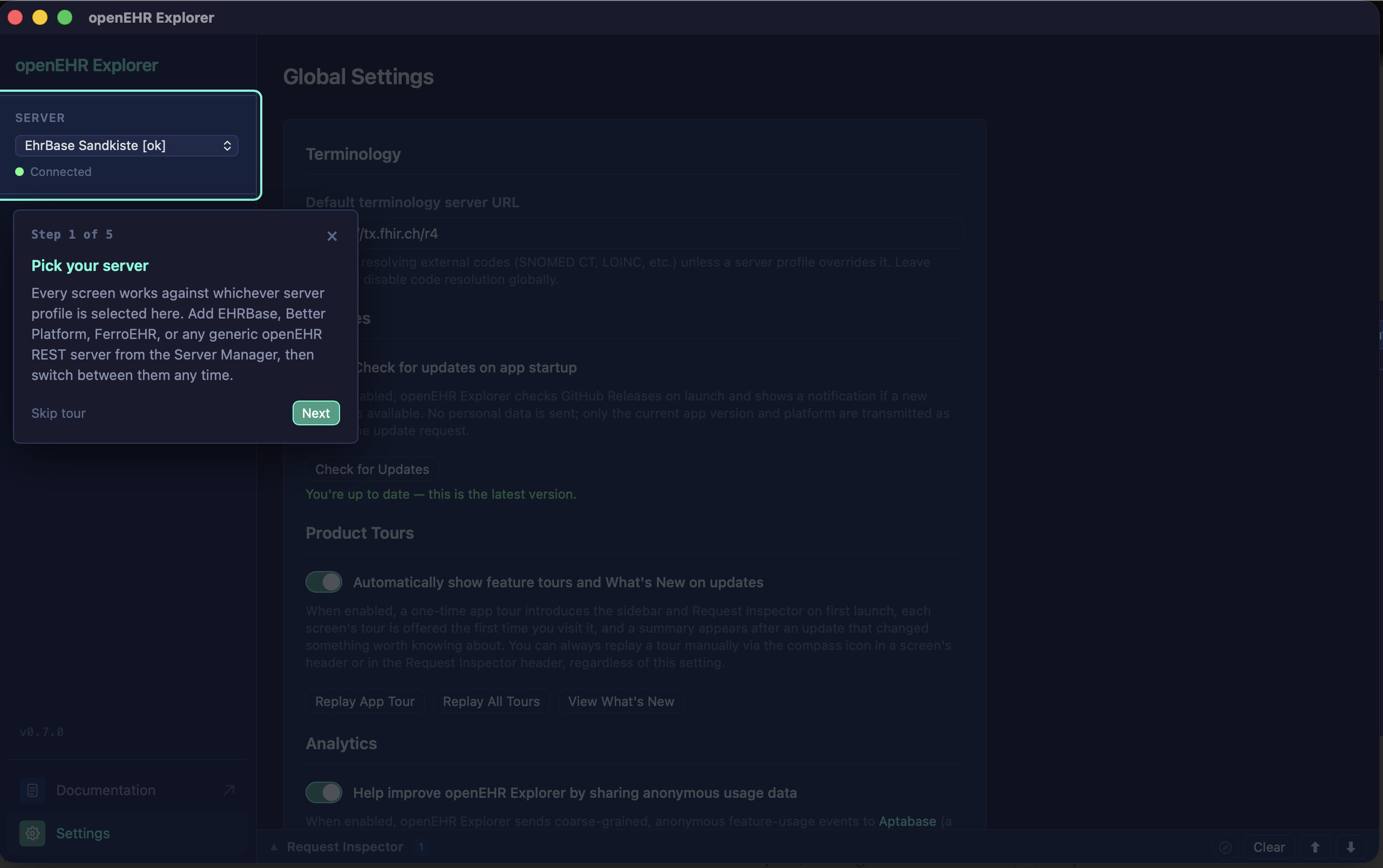
- Multiple server profiles with keychain-backed credentials
It’s free, open source, and available now via Homebrew (macOS), Scoop (Windows), or direct download (macOS/Windows/Linux) — currently at v0.5.0. Feedback and issues very welcome, especially from anyone running it against non-EHRBase servers.
Curious what operating systems the community’s actually using day to day - this might help both projects to prioritize where to invest:
- Apple (macOS)
- Microsoft (Windows)
- Linux (Ubuntu, Debian, Arch …)
Hit a bug or missing something? Please file it on GitHub Issues — that’s the fastest way to get it looked at.
openEHR Explorer v0.7.0 is out 
A quick update since the original announcement — the app has picked up a few features that are directly relevant to this crowd:
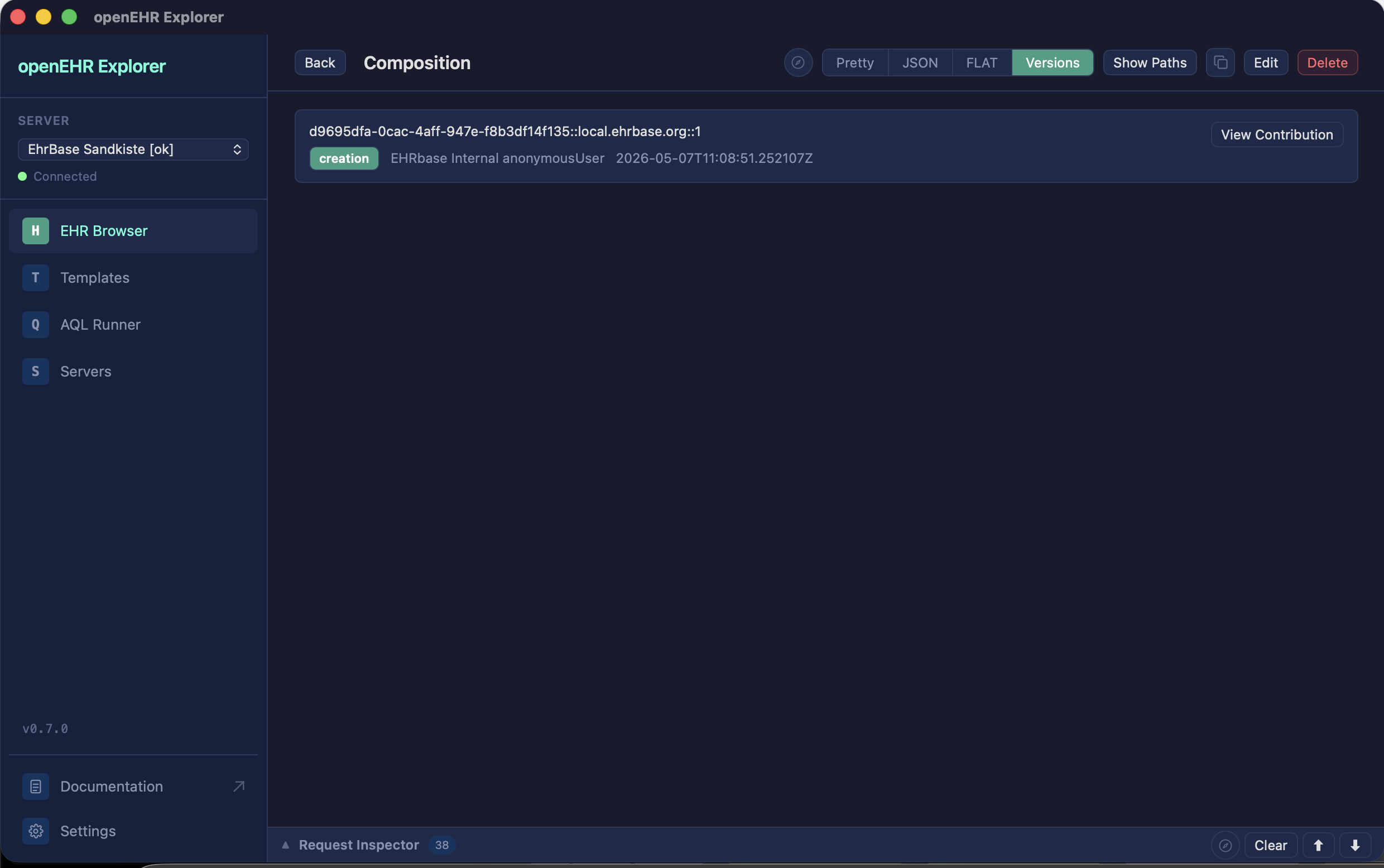
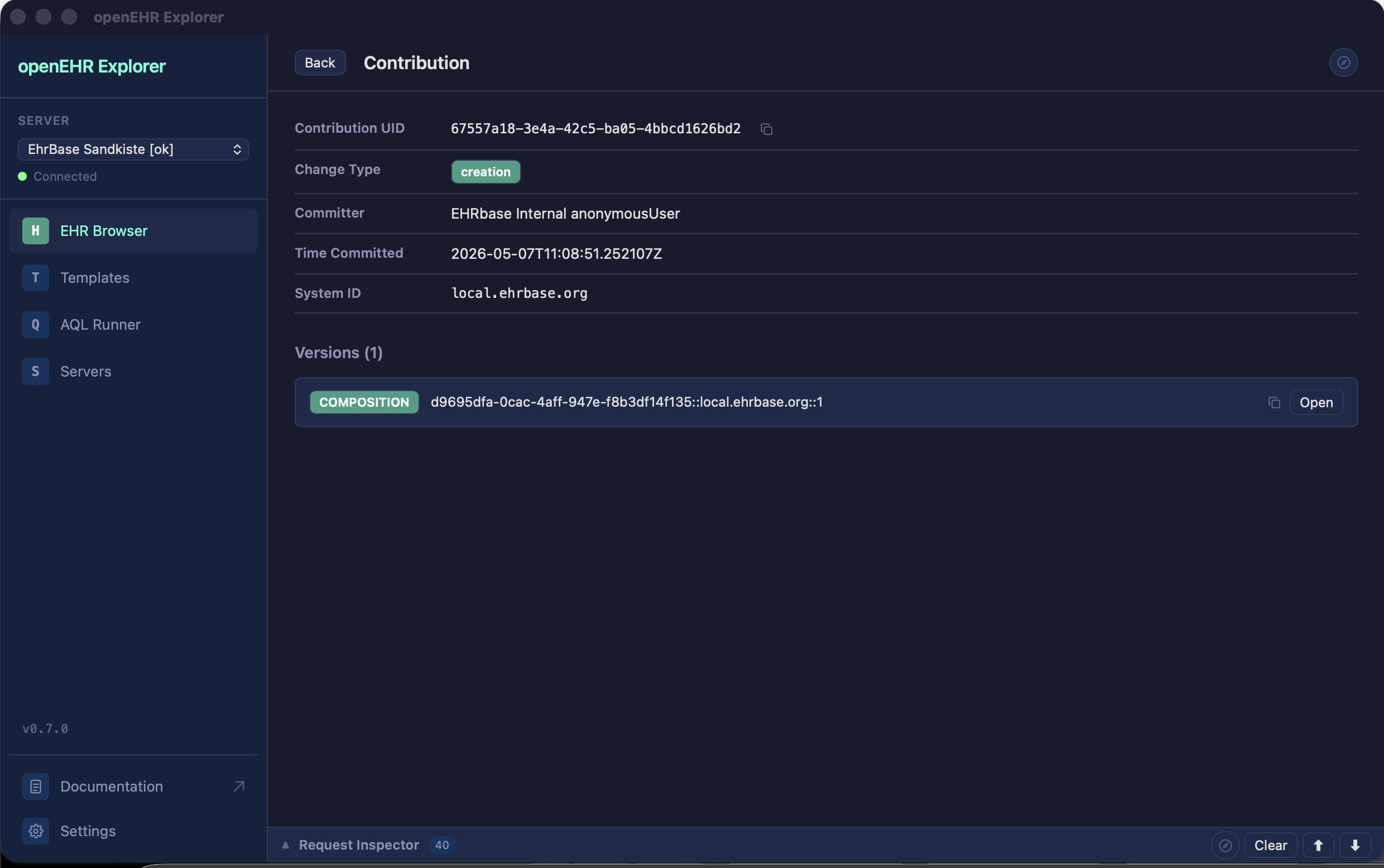
- Contribution / audit trail viewer — every write to an EHR (creating or updating a composition) is wrapped in a
CONTRIBUTION with a full audit trail. You can now open it straight from a composition or EHR to see exactly who changed what, when, and why.
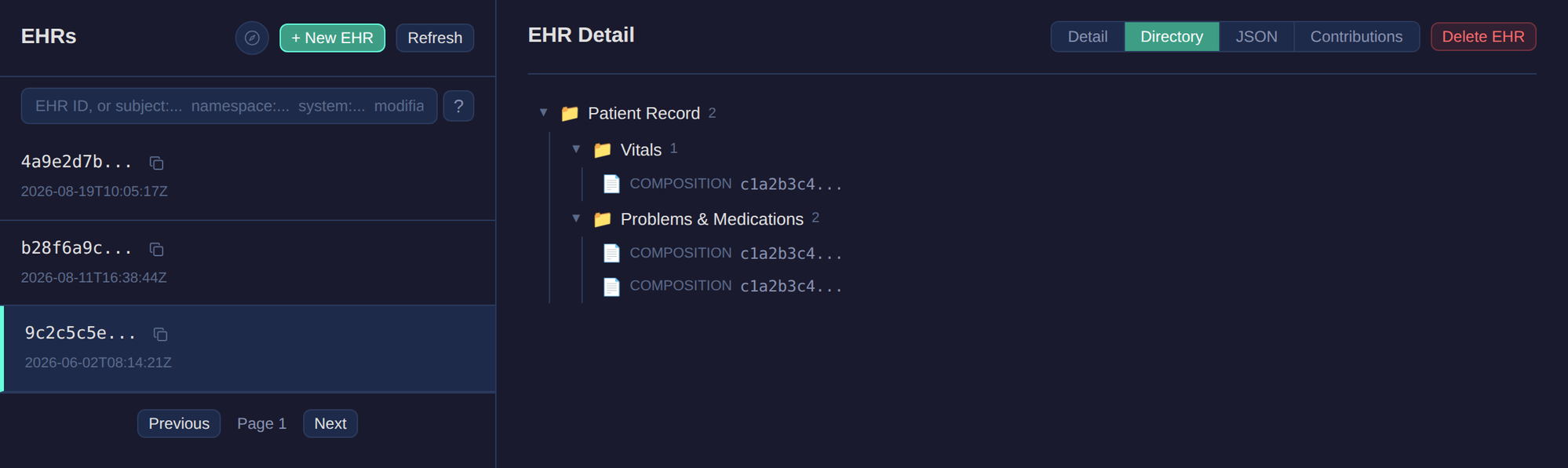
- DIRECTORY browsing — the
EHR_STATUS DIRECTORY (the versioned folder hierarchy linking compositions together) now has its own tab and tree view in the EHR Browser.
- STORED_QUERY execution — server-defined stored queries now show up in the AQL Runner. Pick one, fill in its parameters, and run it without hand-writing AQL.
Smaller things worth a mention: an app-wide intro tour for first-time users.
Full changelog: Documentation — openEHR Explorer
Download (macOS/Windows/Linux): Release v0.7.0 · platzhersh/openehr-explorer · GitHub
As always, happy to hear feedback or bug reports here or on GitHub.
Update: openEHR Explorer is now at v0.9.0
Since the last update, we’ve added:
- Terminology Browser — a dedicated view for looking up codes across terminology systems, with worked examples and a guided walkthrough
- EHR status history & compositions tab — full EHR_STATUS version history plus a proper Compositions tab on the EHR detail view
- DIRECTORY version history — step through folder versions, view at any point in time, edit entries as raw JSON
- Native save dialogs for template OPT downloads, a bunch of UI polish, and fixes for composition create/update against FerroEHR and EHRBase
Still free, open source, and cross-platform (macOS/Windows/Linux). Grab the latest build at https://openehr-explorer.dev/ or see the full changelog at Documentation — openEHR Explorer.
Thanks to everyone who’s tried it and filed issues so far — keep the feedback coming on GitHub or in this thread.
Update: openEHR Explorer is now at v0.9.2
Two smaller releases since v0.9.0, focused on polish and quality:
v0.9.1: Template sorting & dashboard polish
- Template list sorting: the Template Browser can now sort by creation date, template ID or concept, ascending or descending. Newest first is the default.
- Dashboard icons: the EHR, composition and template count cards on the landing dashboard now have icons, so they’re quicker to scan.
v0.9.2: Accessibility & AQL editor fixes
- Accessible contrast: text colors across the app now meet WCAG AA contrast, and an automated contrast check runs on every change so it stays that way.
- AQL editor keeps your query: you can switch to another view and come back without losing what you were writing.
- Linux AppImage fix: the app icon now shows up properly in Linux launchers and file managers.
Still free, open source and cross-platform (macOS/Windows/Linux). Grab the latest build at https://openehr-explorer.dev/ or see the full changelog at Documentation — openEHR Explorer.
As always, feedback is welcome on GitHub or right here in this thread.
Update: openEHR Explorer is now at v0.10.0
A handful of small releases since v0.9.2, plus one with a feature people have been asking for.
v0.10.0: Custom API paths & Request Inspector visibility
- Configurable API path: each server profile can now set its own openEHR REST API path prefix, so servers that don’t expose
/rest/openehr/v1 work out of the box.
- Request Inspector shows failures: in-flight and failed requests now appear in the inspector, not just completed ones, so you can see what went wrong.
- Dismissible errors: request error banners and the server card’s connection test result can now be dismissed.
- Better connection testing: testing a saved server from the edit dialog now uses the stored password or token, and the card result matches the dialog.
- AQL highlighting: stored queries are now syntax-highlighted.
- Accessibility: tree toggles are real buttons that announce whether they’re expanded, and Escape now closes dialogs even when focus stays on the button that opened them.
v0.9.7: Crash reporting & editor polish
- Opt-in crash reports: if you’ve enabled anonymous usage analytics, crashes are now reported too. Reports contain only a scrubbed code location and, for frontend errors, a bounded error type, never messages or data. Nothing changes if you’ve opted out.
- AQL editor: selected text is now clearly visible.
- Linux listing: the AppImage now ships with AppStream metadata and a screenshot for app store listings.
v0.9.6: Navigation shortcut hints
- Hold Cmd (macOS) or Ctrl (Windows/Linux) for a moment and the sidebar shows each tab’s keyboard shortcut.
- Ctrl/Cmd+number shortcuts now always match the order of the tabs in the sidebar.
- The Linux AppImage is now built on Ubuntu 22.04 for broader compatibility with older distros.
v0.9.3 to v0.9.5: Template Browser and Linux AppImage fixes
- Long paths in the Template Browser are no longer truncated early on wide screens (v0.9.3), and the panel no longer scrolls sideways because of it (v0.9.4).
- The AppImage now launches reliably on Wayland (v0.9.4), and release builds repack it correctly so that fix actually ships (v0.9.5).
Still free, open source and cross-platform (macOS/Windows/Linux). Grab the latest build at https://openehr-explorer.dev/ or see the full changelog in the documentation.
As always, feedback is welcome on GitHub or right here in this thread.
New configurable path works very well. I now have ehrbase, Cadasto and Ferroehr working nicely. Just some issues with Better cdr auth to resolve
Thanks @ian.mcnicoll, much appreciated! The configurable path was added on request by the Cadasto team, therefor very happy that it seems to work. If you find any features that would need specific Cadasto adaptation, please let me know. There’s another issue open to add it as its own server type.
Can you tell me more about the issues with Better auth? Which auth type are you trying to configure?
It is just getting a Bearer token that is causing me issues with Better, not related to openEHR Explorer - I have the same issue in Postman - just my credentials that need tweaked. Nothing on your side.
@ian.mcnicoll Thanks for the hint. I’ve added a small section in the docs, on how to setup connections to the different sandboxes (EHRBase, FerroEHR, Better), including the note on how to get the Bearer token.
I’ve looked into it briefly, it looks like Better doesn’t allow 3rd party clients to get & renew client tokens - which would’ve been the most comfortable solution 
Got it working thanks. It was a config issue with Better auth that I got them to tweak.
A small release with a few fixes and polish items.
v0.10.1: Better Platform templates, AQL shortcut & inspector polish
- Better Platform templates: example compositions now fall back to Better’s own example endpoint when the standard one isn’t available.
- AQL shortcut: the run-query shortcut now works as advertised: Cmd+Enter on macOS, Ctrl+Enter on Windows and Linux.
- Request Inspector: HTML responses are now syntax-highlighted.
- Server list: the empty server list links to the new sandbox setup guide, and the auth badge shows a key icon with a tooltip.
The cross-platform angle is what stands out to me, since so much CDR tooling assumes one OS or a browser tab. As someone in Baltimore who mostly tinkers with everyday projects rather than clinical systems, I’d be curious how it handles browsing archetypes versus compositions — is the explorer read-only for inspection, or can it do any editing? Also wondering whether it connects to a remote CDR or only local data. Those details would help people decide if it fits their workflow.
Thanks for the questions!
Archetypes vs. compositions: This is mostly settled by the openEHR REST API itself. Its Definition API only exposes templates (OPTs) and stored queries. There’s no archetype endpoint. Archetypes reach the CDR flattened into a template, so that’s the only form a CDR client like the Explorer can see them in.
The template browser shows the full Web Template tree, with each node’s archetype ID, aqlPath, RM type and constraints. Compositions are displayed with those template labels, so you see “Systolic: 120 mm[Hg]” instead of at0004. Raw canonical and FLAT JSON are always one click away.
If you want to browse or author archetypes as standalone artifacts, CKM and Archetype Designer are the right tools. The Explorer starts where your templates are already deployed to a CDR. It just gives you a comfortable UI for the REST api.
Read-only or editing: Both. You can browse and inspect everything, and you can also write:
- Compositions: create, edit and delete. Data entry uses a form generated from the template’s Web Template (built on medblocks-ui), so you don’t have to write FLAT JSON by hand.
- EHRs: create and delete them, and update EHR_STATUS.
- DIRECTORY folders: full create, read, update and delete.
- Templates: upload OPTs by drag and drop.
- AQL: a query editor with autocomplete, and you can save queries for reuse.
Every change goes through the CDR’s own versioning. You can follow it in the version history views for compositions, EHR_STATUS and DIRECTORY, and in the contribution/audit viewer.
Local or remote: Both. It’s a client for the openEHR REST API, so it connects to whatever CDR you point it at: a local EHRBase on localhost:8080, a staging server, or a hosted one like Better Platform. You can save several server profiles and switch between them without restarting. Credentials are stored in your OS keychain or in encrypted files. The Explorer doesn’t keep a copy of your clinical data.
Docs and downloads: https://openehr-explorer.dev
I hope that answered your questions.